Tuesday, April 30, 2019

O-P-L Reflection

When I initially began the instructional technology program, I was a bit hesitant. I had several years of education experience, but my largest number of years of experience was within higher education. All of my classmates worked in the K-12 industry in various capacities and felt that I would not be able to relate to anyone throughout the program. I soon learned that I was very capable of being able to keep up, maintain and learn something new all at the same time. My peers were very supportive and I began to overcome the challenges of many textbooks referring to K-12 educators and flip the content and apply that knowledge within the higher education environment.


Picture
https://www.learn21.org/cetl.html
In doing so, I have the use of many frameworks and standards that align with state department requirements and use those to make sense and understand how it relates to the college environment and to use it to the benefit of the students within my classroom. The Consortium for School Networking, (CoSN), Certified Educational Technology Leader, (CETL) framework, is a set of 10 skills that are needed to be successful in the educational technology arena. (See figure to the right that highlights each area required)


Considering this framework is designed for use in the primary and secondary environment, this framework allowed me to evaluate and really see the areas in which I have contributed within my current environment. Most of my skills gained fell in the area of II. Understanding the Educational Environment, specifically the Instructional Focus + Professional Development and Team Building and Staffing. I created professional development training for faculty in order that they were able to use our student management system more effectively and better manage, monitor and report on student data. Also, through this training, it allowed for opportunities for additional training to be created through collaboration from the education division on how to use curriculum mapping and relate those to the current student and course learning outcomes.


Infographic

The area of I. Leadership + Vision is an area where I would have liked to play a larger role in assisting with creating a vision to support the strategic goals for the area of technology. My current position does not put me in a place where I can be an active participant in that area, however, through the instructional technology program, I had the opportunity to learn how the development of the vision assists with creating a technology plan that meets the needs of the stakeholders, administration, students, and faculty/ staff. I was able to create my own version of a technology plan and created a presentation outlining that plan. I also created an infographic outlining the key areas required when developing a technology plan.


The last area of the framework where I can identify skills is under III. Managing Technology & Support Resources, Communication Systems Management. Being in the college environment, and as a faculty member, I have little influence or direction over our information technology area. However, I was chosen to be a member of the Educational Technology committee. This committee was created under new leadership in the office of Academic Affairs. It was created to allow faculty member to discuss and research new and emerging technologies that will support our curriculum and student learning. This committee also has the responsibility of researching other institutions to see how they manage and support curriculum design and development, any grants that may support enhancing computers/labs emerging technology, etc. In this capacity, I've had the responsibility to research and maintain the database for the information gathered. The committee meets monthly to discuss additional findings and then added to the database for reporting to the dean's office. 

Although I've completed all of my instructional technology in the higher education environment, I've been able to accept the challenge of learning frameworks and standards for the K-12 school districts and apply those in my current area. It has been a eye opening experience that has equipped me with great knowledge that I can use and apply in all facets of curriculum design, professional development training, creating a vision, preparation to meet with administration as well as within the other 10 skills. As an observant, participant and leader, the CETL framework will be used as a guideline to development future instructional technology goals within my personal development and within my class instruction.

Friday, August 3, 2018

1st Instructional Design Presentation

Good instructional design has been the term we've embraced in the course for Instructional Design and Development at the University of Montevallo. I've learned a number of things throughout the course to aid me in developing the best curriculum, the best presentations, the best of the best of all things presentations.....so much learning that it makes me a bit nervous in designing my own for the first time.

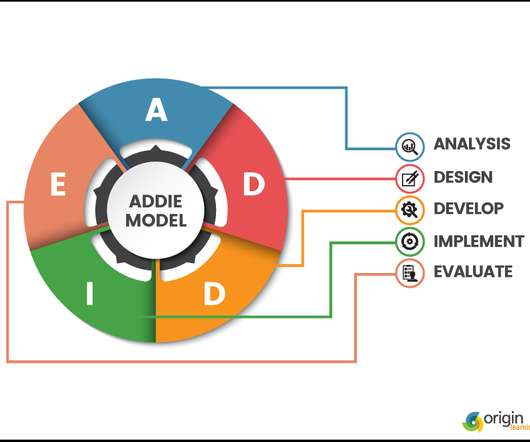
One of the things I've learned the most is designing engaging content that allows the learner to make a connection to the lesson and then be able to apply it. Anyone who designs should create with the end in mind and to develop content that delivers good instructional design. In order to do so, we need to use a model, such as the ADDIE model
https://www.elearninglearning.com/instructional-design/
that provides guidance in ensuring content is effective and supports learning in a creative and effective way. As you go through the steps of a design model, you will use various strategies to continue in the development of your content. In the text of Streamlined ID, a practical guide to instructional design, the authors suggest "as you design instruction, consider the effects on learning" and to "consider strategies and technologies" at the same time (Larson and Lockee, 2014, p.150). 

Choosing the type of technology is another area I learned to support good instructional design. From my experiencing in creating my own presentation, this made the task a bit more challenging. I chose to present a training session to faculty at our institution on using our current student management system. I thought this was going to be a simple task because I can use the system with my eyes closed, but as I begin to look over what I needed them to know and think about the concepts learned in the course, I realized I had to look a this from a different angle and begin to apply the model steps and strategies learned. 

Take a look at my 1st attempt to design a presentation for the course: Where Are Your Students???

As I designed my presentation, I found it challenging to find technology that would support how I wanted to present it. After realizing I was making this more difficult than it needed to be, I finally found ScreenCast-oMatic, Screencast-O-Matic.com, which allowed me to create and present as I wanted. Review my presentation videos below:


Video 1

Video 2


Video 3

(The only drawback on this particular technology is that it only allows you to record 15 minutes at a time)

Creating a presentation using good instructional design requires alot of time and application. Designs that are engaging, interactive, use of technology that fosters learning, and help learners to understand content, and maintain their attention, are ideally what you want. Know that it takes time, preparation, to produce good, quality instruction. This was a fun and interactive activity to push my limitations that enhanced my skill set. I'm looking forward to developing more and more content and become an instructional designer in the future.

I hope you take the time to review my presentation link along with the videos. This is my first presentation using good instructional design tips that I learned throughout the course. 

Enjoy!

Resources:
Larson, M.B., & Lockee, B.B. (2014). Streamlined ID, a practical guide to instructional design . New York, NY: Routledge.


Friday, July 27, 2018

New technology for training


https://images.freeart.com/comp/art-print/fa18410097/technology-word-cloud.jpg
As you develop training for your learners, you have to think about what type of technology will you use to deliver the content. "Technology can be defined as any tool that helps you to take action more efficiently or think better" (Larson and Lockee, 2014, p. 184). Oftentimes technology is seen as the physical tool used to teach, however, as instructional designers begin the development phase of their learner content, technology is the used to "meet a specific instructional need" (2014, p. 184). A designer should think of technology that will engage learners and ultimately allow them to accomplish the determined outcomes and objectives.

In looking over the many technology resource tools that support instruction, there were many that I had not heard of, and some that I have heard of but never used. Adobe Presenter 11.1 is the tool that was the most interesting and one I would like to consider to use for future training that I will design, develop and implement.
https://wwwimages2.adobe.com/content/dam/acom/images/shared/product_mnemonics/96x96/presenter11_96x96.png

Adobe Presenter allows you to transform slides such as PowerPoint into interactive and engaging learning presentation. It lets the user create interactive training videos, scenarios and quizzes. For developing videos, your webcam audio and video can be used from your laptop or desktop, without having to buy expensive video camera equipment. Also, users are able to track learners performance and be able to integrate into other compatible Learning Management Systems.


There are a many technology resource tools that are available to use to create learner content. It was very helpful to know there are a number of options to help with designing engaging and creative content to ensure your learners are learning with technology. Larson and Lockee state in their book Streamlined ID, A practical guide to instructional design, when you are deciding on the technology you will use, "determine your learner's needs and how technology might support those needs before selecting a technology" (2014, p. 184). Learner needs should be determined in the analysis phase of the ADDIE design model, and as the designer continues to build content and go through the stages of the design model, technology should be considered at the same time. 


Adobe Presenter seemed to be the most interactive tool that would fit the training that I am designing. I like that it's user friendly and allows you to take Powerpoint slides and turn them into interactive teaching modules. The software does allow a 30-day free trial and after that you can choose to sign up for different levels of service at a cost. I do think this tool will allow me to add some engaging content and deliver on screen scenarios to support the scenario based strategies I have in mind for the learners. I also will be able to create my own videos that I can record using my own laptop/ desktop which makes the creation simplified and again allow me to be as creative as possible in engaging my learners. 

http://www.online-trainingcourses.com/wp-content/uploads/2014/04/online-learning.jpg

Resources:

Adobe ELearning (2015, September 14). Adobe Presenter 11 & Transform slides in into interactive eLearning [Video file]. Retrieved from YouTube website: https://www.youtube.com/watch?v=601twbBg6Vw

Larson, M.B., & Lockee, B.B. (2014). Streamlined ID, a practical guide to instructional design . New York, NY: Routledge.


Friday, July 20, 2018

Training Strategies to foster learning

https://previews.123rf.com/images/dizanna/dizanna1506/dizanna150601418/41206533-strategy-word-cloud-education-concept.jpg

When providing training for individuals, you want to give them an experience that is engaging, fun, interactive, and content that is deliverable to others. In instructional design, using a strategy such as a design model will be beneficial in helping you to create the right content for your learners. "Instructional strategies are the very heart of an instructional design and serve to foster student learning including pre-instructional activities, presentation of content, learner participation, assessment, and follow-through activities" (Larson and Lockee, 2014, p. 149.) (Click the link below the image to learn more on using an instructional design model)


http://educationaltechnology.net/wp-content/uploads/2015/12/instructional-desing-models.jpg

As you develop content for training you should "consider teaching strategies and learning strategies" for your design (Larson and Lockee, 2014 ,p. 149). Some strategies that I have used in my classes and some that I have been used with me are scenario based learning strategy and strategies to build a sense of community. These strategies, provided a unique way of getting to know each other and allowing them an opportunity to connect with one another and to the training/ class. Having a strategy helps the trainer to deliver effective and relevant content. 

Building a Sense of Community

Having students to share information about themselves is a strategy that can be used to build a sense of community. In my classes, I have students to create an introductory video to give others more information about themselves. I provide them with examples of different video types such as Powtoon, WeVideo, or create their own video using their phones. I ask them to be as creative as possible and give us more details about them. As an example, I had one student who had a cellphone recording of himself mimicking the MTV show MTV Cribs, however his was titled Bear Cave and he recorded his room, clothes, and favorite things It was fun and gave us a different look at him. (Click to take a look at his introductory video below). I thought this was a unique way to get to know one another and I think it works but there is more I would like to develop when using this strategy in my classes. I'm not sure what they will look like just yet but as I continue reading through Larson and Lockee text, Streamlined ID, I believe I will be able to create a more connected learning activity out of the introductions.


Scenario-Based Learning
Scenario based learning is a strategy that I have been apart of in a training session. This strategy worked well for the professional development that was being introduced. At the time, I was and academic advisor for a college and we were being trained on the different situations we may encounter and how to handle them. One particular situation we were placed in a setting where we had to learn how to interact and communicate with 'helicopter parents'. This was a fun but great learning experience in dealing with parents. There was a screen behind us that displayed the situation we would encounter. The 'parents' knew the scenario and would 'act' it out, and as an advisor we would address the situation using methods we were taught. It was hilarious and fun but it gave us a clearer picture on how to best deal with these types of situations. 


http://images.clipartpanda.com/strategy-clipart-cliparti1_strategy-clipart_07.jpg
Using either of the above mentioned strategies would assist the learners in learning the content and the trainer providing effective instruction. My experience with both taught me that you can create fun and engaging training or classroom sessions but at the same time instructional design models also teach you how to develop your content to ensure your strategy has an effect on learning. 


Resources:

Educational technology(2018). Retrieved from https://educationaltechnology.net/instructional-design-models-and-theories/

Larson, M.B., & Lockee, B.B. (2014). Streamlined ID, a practical guide to instructional design . New York, NY: Routledge.

Parker, B. (2018, January 26). Braylen Parker Bear Cave TV [Video file]. Retrieved from YouTube website: https://youtu.be/sfDoFoGKD6c


Friday, July 13, 2018

Good training vs bad training

Image result for training professional development word cloud
https://www.shutterstock.com/image-illustration/word-cloud-coaching-168764456

Reflecting on many occasions that I've spent in a training session or a professional development conference, there were some that I absolutely loved and those that were a complete waste of my time. Certainly many of you have experienced the same and probably share the same thoughts. There were probably many questions that cause you to wonder, did they prepare for this? Do they know/ understand the content? Do they know the audience? Then there were some that you thought that was the best experience I've participated in a long time! 


As we continue to learn and advance in education, we want to know what's the best way for our students to learn and how do we make sure they are engaged and teaching remains effective? We attend many conferences and training sessions to ensure we are equipped with knowledge, skills and abilities to deliver instruction. Our expectation is to gather valuable information that we can use immediately and apply the information directly into our classrooms. When you are on the receiving end of training what do you consider as good effective training session?
Image result for instructional design
https://www.elearninglearning.com/instructional-design/


As a student in the instructional technology program, I've learned various ways to develop effective training through different models of design, such as the ADDIE Model. The ADDIE model, as the graphic shows, uses the process of analysis, design, develop, implement, and evaluate. Using this as a mode will allow curriculum develops to use good instructional design that will engage those who are being trained. Instructional Design, (ID), is "the systematic and reflective process of translating principles of learning and instruction into plans for instructional materials, activities, information resources, and evaluation" (Larson & Lockee, 2014, p.8). In learning this I realized that I have participated in many training that did not exhibit good instructional design.

I participated in a 2-day training session organized to provide professional development. It was a 2 day session of a 50 PowerPoint slide where the trainer read each slide! I literally slept for 2 days in those sessions. This is a perfect example of bad design and in learning about ID, I wonder if the creator considered the audience, delivery, design, etc. My hope is that I do not have to experience that again.

Another professional development opportunity I participated in was great. This 4 day session placed the participants in work groups and were given a project to complete each day, culminating on the 4th day. This included visiting the city together where the session was held, eating dinner, and enjoying entertainment. Although I know, every professional development is not design the same depending on where you go and what the training is about, I believe that they all can be design in a similar fashion, using an ID model.

As I continue to work and mold my mind around what type of training/ professional development I want to provide, I want to ensure that I am delivering good valuable content using good instructional design that will be remembered, applied and shared. Within my classroom, I tell my students that my mantra is that I want them to 'make a connection and apply it', and I want the same for those that I will develop and create training for. My desire is to create a professional development mentor/coach training that is beneficial to current and new instructors on campus. In reading the white paper, Learning environments in the workplace, it gives 9 characteristics of learning, 9 characteristics of learning, that can be used in helping to understand how to build effective learning in your place of work. I found this to be valuable information, along with using the ADDIE model and theory in ID as an informational guide to guide me as I continue to analyze and develop training for our instructors. My hope is to not ever create a 50 slide presentation to me audience!


References:

Larson, M.B., & Lockee, B.B. (2014). Streamlined ID, a practical guide to instructional design . New York, NY: Routledge.

Wedaman, D. (2014, February). Bridging the gap, building a learning environment in the workplace. Educause , (), . Retrieved from https://library.educause.edu/~/media/files/library/2014/2/eli3031-pdf.pdf


Thursday, June 21, 2018

3-2-1 Reflection

This blog will be discussing a reflection on virtual learning. We've learned that virtual learning, online learning, online education, or distance education as "institution based, formal education where the learning group is separated, and where interactive telecommunications systems are used to connect learners, resources, and instructors (Simonson, Smaldino, Zvacek, 2015, p. 6). As I reflect on this topic I can see how virtual learning has been implemented into our school districts, colleges, businesses, and jobs. Over the years and it has become a necessity and educators are meeting the demands of online learning through implementation of distance education throughout their districts.

Through my review of sample school district policies and other literature that provided details on online learning, I learned and was surprised about 3 things: (1) Alabama has a fully accredited online school within the Athens City School district, (2) there is an actual state law,(https://web.alsde.edu/legislativebills/2015Regular/SB0072_ENACTED.pdf ) that school districts must have a distance education program, (3) and students are able to take an online class for credit in their respective districts but may be taught by teachers from another school district.

Athens City School district, in response to the legislature that was passed, created a fully online school for students K-12. This school was developed for students throughout the entire state that may want a more flexible option for school. I was surprised in learning that this was designed and implemented in school year 2016-2017. In learning about this, I created an infograhic that briefly describes how Athens Renaissance School , https://www.k12.com/content/fts/athens/en.html, was developed: (see below)
Creating an online & blended public school by Jessica Bynum Continuing on with my reflection, there were two things that I was concerned with regarding online learning, (1) some school district school policies were not very specific or defined, and (2) how/ when course would be evaluated and how often programs would be reviewed for effectiveness. "Policy development and implementation is an important topic to be addressed when an organization considers distance courses and programs" (Simonson et al, 2015, p. 287). I was concerned in reading some policies that did not completely outline their mission and purpose and not enough specifics in student/ parents responsibility. They were written in accordance to the passed legislature but not specifics for the district. The text states the following areas should be covered in a distance education policy:

  • "Governance and Administration of the Distance Education/ Online Learning Program
  • Academic Policies
  • Quality Control
  • Faculty-Related Issues
  • Student-Related Policies
  • Fiscal Issues
  • Legal Issues
  • Library Policy
  • Policy on Acceptable Use of IT Resources" (Smaldino et al, 2015, p. 290).
In addition to those areas I learned, and those that were concerning, there is one question I have regarding virtual learning. Will all districts receive the same type of funding, technology, and resources statewide? I think this will be important for schools to maintain, sustain, and grow as technology continues to advance and be used in virtual learning. "Distance education is expensive", (Simonson et al, 2015, p. 296), and something I think administrators should consider as they continue to plan for future online learning.


Resources:
Alabama SB72: https://web.alsde.edu/legislativebills/2015Regular/SB0072_ENACTED.pdf

Athens City Schools: https://www.k12.com/content/fts/athens/en.html

Simonson, M., Smaldino, S., & Zvacek, S. (2015). Teaching and learning at a distance (6th ed.). Charlotte, NC: Information Age Publishing, Inc..

Tuesday, June 19, 2018

The Chosen One, Blackboard


Image result for blackboard lms

Blackboard, (Bb) is the chosen learning management system that will be discussed in this blog. Although it was listed on the class Wiki page, I chose this CMS because our institution is currently using this system. We implemented Bb in the fall semester of 2016 and many users here at the college are still learning how to use it effectively.

As our executive committee planned to move towards an online environment of providing distance education, they wanted to make sure that the chosen CMS would allow for instructors to have a smooth transition from a traditional classroom to an online format. They also wanted it to be a good fit for student and instructor use, and be user friendly for them both.


Instructional Design
Blackboard, is a  nicely built system that currently meets our needs. It was designed with the "understanding that the way people learn is dynamic", and education will continue to evolve. (Blackboard, 2018). At our institution, instructors met with their respective divisions to plan which courses would be delivered through distance learning and plan their curriculum. The text tells us that "teaching at a distance requires planning and organizing" (Simonson, Smaldino, and Zvacek, 2015, p. 127). Reviewing Bb you will find that it meets the needs for the type of online instruction that the institution desires. Instructors want to be able to load course curricula, be able to track student attendance, create rubrics, measure student performance, grade assignments/ tests, and create discussions. These design features allows for a manageable student/ teacher learning experience. "Design is the fundamental element of effective instruction"(Simonson, et al, 2015, p. 128), and allows for instructors to teach and students to be able to learn at "anytime" and "anyplace". 

Take a look at the video below that provides details on the "The Learning Experience" by Blackboard:


Teaching
Image result for pic teaching onlineUsing Bb system has helped instructors to be more creative in the delivery of course curricula and manage students more effectively. Instructors are able to coordinate with textbook vendors to have their books loaded into Bb with the corresponding course. Some vendors even provide the service of loading and setting up the course in each instructor'shell. Once the content is loaded, instructors are able to set up weekly coursework, learning outcomes, create tests, track their attendance, manage their progress, even submit progress statuses. These components "create a learning experience necessary for student learning" (Simonson, et al, 2015, p. 129). 


Students
Image result for students learning onlineAs instructors continue to use the system, there is a need and desire to create an engaging learning environment as well as to have collaboration among students in the online environment. The "student -centered approach to learning fits well into distance education environments", (Simonson, et al, 2015. p. 168). Bb offers a part of the application where instructors are able to build active discussion boards and videos to create an engaging course. Students can also download the Bb app that allows for more interaction with instructors, easy accessibility to the course and monitoring of course progress. For this reason, Bb is a good option for use by the institution as it continues to explore and develop more use for online development and learning.


Support Materials
Bb does provide various support materials to aid in instruction. The texts emphasizes that printed materials, course syllabus and interactive study guides improve the distance education environment, (Simonson, et al, 2015, p. 204). In Bb you can create your own syllabus or use their shell to create. Instructors are also able to create study guides, or have the option of using the loading textbooks content that has study guides attached to the text.The textbook loaded into Bb is an example of printed text and instructors can load and attach their own material to support course instruction. 


Assessment
As instructors continue to use Bb, it was an important function to be able to assess student progress. Bb has a piece where instructors are able to grade student assignments, tests, discussions, etc., and provided feedback through a rubric. They are also able to see how student's are progressing and have the ability to send 'alerts' of students that are not performing well. This functionality allows instructors to track their students progress, see where they need to improve and make recommendations or referrals to the students. "Assessment is defined as the process of measuring, documenting, and interpreting behaviors that demonstrate learning" (Simonson, et al, 2015, p.226). This was very important for instructors to have and Bb provides that functionality.
Image result for word cloud online learning
Blackboard, the chosen one, is the CMS for our institution. It not only meets the requests of instructors but also meets the needs of student learning and engagement. The features of the system and it's user friendly resources and content allows for more creativity and course development for teaching. Bb is a great tool that supports higher education needs and appears to be keeping up with future trend as secondary education continues to advance.

Resources:
https://depositphotos.com/42564661/stock-photo-word-cloud-e-learning.html
https://www.google.com/search?hl=en&biw=1242&bih=602&tbm=isch&sa=1&ei=AK8pW4LuCcXEswXGz6H4BA&q=students+learning+online&oq=students+learning+online&gs_l=img.3..0j0i8i30k1l2.111739.113890.0.114063.24.18.0.1.1.0.199.1943.0j15.15.0....0...1c.1.64.img..9.15.1829...35i39k1j0i67k1.0.pCE26X5p7-Q#imgrc=EvKLtMfzb-QwUM:
https://www.learncube.com/benefits-of-virtual-classroom-for-teaching-online.html
https://www.youtube.com/watch?v=CM3Csm3UNyo
https://commons.wikimedia.org/wiki/File:Blackboard_Inc._logo.png
Simonson, M., Smaldino, S., & Zvacek, S. (2015). Teaching and learning at a distance (6th ed.). Charlotte, NC: Information Age Publishing, Inc..


Tuesday, June 12, 2018

Positive and Negative Experience with online learning

I remember the first time I saw someone doing homework on the computer. It was the year 2002 and a coworker and I were chatting and he kept looking and typing while we were talking. Out of curiosity I asked, "what are you doing on the computer & why do you keep looking back and forth at two different documents?". He replied, "I'm writing a paper". This conversation led to my initial learning on completing a degree online. I was surprised, shocked and in disbelief. How can this be possible? People can actually obtain a degree, learning, studying, writing papers, etc. just on the computer? No way.......and in 2008 I became a Phoenix by earning my Masters in Business Administration from the University of Phoenix.

"We Rise"
It's amazing how we've evolved since that time and grown into this technologically advanced society where everything can be acquired at the touch of a button, or from our phones to our cars. We've also witnessed these advancements within education and how it continues to grow and become more accessible in the classroom.


My experience  with distance education has been positive. It has afforded me the flexibility to be an online learner and learn anywhere at anytime and with flexibility. The text defines distance education as "institution based, formal education where the learning group is separated, and where interactive telecommunications systems are used to connect learners, resources, and instructors" (Schlosser & Simonson, 2009, p. 1). At the time that I became an online student, I'm not certain if there was a definition for distance education, however the term online was used to describe those students who were learning online. Simonson, Smaldino & Zvacek write in the text "On-line Learning/ On-Line Education is the common distance education term used in higher education" (2015, p. 33). Since my experience of completing my MBA degeree, whenever there is a training opportunity or course that is offered, I always ask if there is an online offering. My preference is now to conduct any learning experience to an online format.

I haven't had any negative online learning experiences. Over the years as I have completed so many training's, teaching online courses, obtaining an online degree from various entities, that the positive experiences outweigh any negative. I can note that there are a few challenges that can occur that can be quite frustrating and cumbersome such as:

  • tech issues
  • limited accessibility to internet
  • no WiFi connection
  • power outages
  • damaged laptop
  • no textbook, etc.
  • posture/ back issues
Many of these challenges can cause a negative impact on your online learning experience and can result in a delay in completion of assignments. Take a look at this video produced by students on the advantages and challenges of online learning:


Taking a walk down memory lane, remembering how I first came to learn about online learning or distance education, and how much I have accomplished over the years with acquiring degrees, training, even teaching online courses, I am truly amazed at how far advanced it has become. Looking at how dependent we have become on technology and not even thinking about challenges that may arise when we are using our many devices. Online education will continue to evolve and become more advanced and I'm hoping to continue to learn and be able to apply and teach others all the knowledge I have gained in order to keep up with the advancements. My hope is to continue to evaluate, research and be able to share my positive and negative experiences to assist someone else along their online/ distance education journey.


Wednesday, November 15, 2017

Coaching Conversations

In my previous blogs, I talked about coaching relationships with teacher/ faculty, and in my other blog I discussed coaching as a benefit to professional development. In this blog, I want to discuss coaching in a college environment with seasoned/ veteran faculty members through coach/ teacher conversations.

As you think about teacher coaching and mentoring, you think of administrators who create the coaching environments and the schools who implement coaching/ mentoring among their teachers. Most of the readings I have reviewed in my instructional technology studies emphasizes the K-12 teachers but not much regarding faculty/ instructors in the college environment. Considering I am in higher education, I strongly feel that it's possible to coach and mentor faculty, although it is known they are usually seasoned and know their particular subjects very well. I also think that because we sometimes become caught up with that idea that we forget faculty need continuous classroom training along with professional development. The text states that "coaches can use the processes outlined in the book with any teacher in any school to improve performance" (Marzano & Simms, 2013, p. 213). With this in mind, I feel coaching can be adapted and used in the college setting to enhance faculty teaching in the classroom.

Using coach-teacher conversations such as: "(1) reflecting, (2) facilitating, (3) coaching, and (4) directing", will allow faculty to be mentored by a faculty coach to help them become more effective in their instruction )Marzano & Simms, 203, p. 213) The video below provides a detailed description as outlined in our text:


As you consider the different kinds of conversations, one understands that many of the instructors are  considered experts or seasoned in teaching, however, being coached on strategies to use in instruction may have an impact on student performance. In our college setting, we have an open door policy, which means we accept all students regardless of their test scores or high school GPA. It is a known fact a large amount of our students are under prepared and require additional support in understanding and learning so they are ready for college courses. They are placed in fundamental studies course that measures where they are and then curriculum designed and taught on various levels to improve their performance, increasing their achievement and be able to move to college level coursework. With this in mind, the coach-teacher conversation can be used to see how effective the strategies are and the areas in which the instructor could improve to maximize student learning.

The coach-teacher conversation is used to improve teacher instruction and improve student performance. Coaches use strategies to help teachers to recognize their strengths and weaknesses and develop growth goals so they are able to be more effective in their teaching. The following quote gives a description of what a coach is and does:


Reflection on this quote, helps the teacher and coach see that the responsibility of the teacher is to create a learning environment for students where they can grow and increase their level of achievement. The responsibility of the coach is to show the teacher areas for growth and improvements to enhance their classroom instruction. I believe it would be a great idea to create a coach-faculty relationship on campus that uses coach-teacher conversations to help identify areas of improvement in classroom instruction that will in turn increase student achievement.


Sources

Marzano, R. J., & Simms, J. A. (2013). Coaching Classroom Instruction . Bloomington, IN: Marzano Research

PCG (2010, October 14). Improving Instruction through strategic conversations with teachers [Video file]. Retrieved from YouTube website: https://www.youtube.com/watch?v=vCyLeMH2Ucg&t=14s

Wednesday, October 18, 2017

Creating a coaching relationship with your teacher/ faculty

We are living in the age where all things have become technical, tech savvy, technologically advanced, electronic devices, a microwavable response to almost everything. In our homes, jobs, extracurricular activities, schools and colleges. Technology has grown and become a staple in almost everything we do and have made our lives simpler, easier, most things at the push of a button.

Watch this video to see how technology has changed over the years:
As you can see, we have evolved in many ways that has caused us to lead simpler, faster and more efficient ways in response to technological changes. We are what authors have called "digital natives" and have become "immersed in these technologies" (Conefrey, 2016, p. 37). So much so that these technological changes have spilled over into the field of education and within our classrooms.

Administrators and educators have answered the call to integrating technology into course curriculum, classroom instruction and in teacher professional development. This has created the push to develop initiatives and strategic goals to include plans in implementing and teaching technology in schools. One area that requires emphasis is in faculty training and professional development that will create opportunities for them to meet students where they are and have an engaging learning experience through technology integration.

In thinking about technology integration between teachers/ faculty, you have to consider the coaching/mentoring relationship that has been established. In my previous blog, I discussed "Coaching as benefit to Professional Development" (Bynum, 2017), and gave some insight in coaching theories and models, putting them into practice and how it becomes a benefit to teacher growth and development and student success. This is done by setting growth goals and the coach works with the teacher to progress on a scale. The five levels of the scale are:

  • Not Using (0)
  • Beginning (1)
  • Developing (2)
  • Applying (3)
  • Innovating (4)
In establishing these growth goals a coach must assist the teacher in moving from one level of the scale to the next. In order to progress through the scale, the coach must ensure the teacher can "understand the research and theory for his growth-goal element" (Marzano & Simms, 2013, p. 37) and apply a strategy that can be implemented in the classroom. Then the coaching relationship moves to the next level of the scale to helping the teacher identify parts of the strategy that may not work and correcting any mistakes. Once this has been determined then the teacher moves on to the next level and the coach assists the teacher in applying and integrating several strategies that meet students "unique needs" (Marzano & Simms, 2013, p. 155).


There are several ways to continue the coaching relationship with teachers/faculty. Conducting a self audit and establishing growth goals, helps the coach to assist the teacher in moving through a measurement scale that monitors their progress in implementing strategies in the classroom. The coach must mentor the teacher so that they are providing innovative strategies where students are growing and learning while at the same time building trust and strengthening the coaching relationship.


Conefrey, T. (2016, July-August). Technology in the college classroom: Crisis and opportunity. Educational Technology, 56(4), 37-40.

Marzano, R. J., & Simms, J. A. (2013). Coaching Classroom Instruction . Bloomington, IN: Marzano Research.


Wednesday, September 27, 2017

Coaching as a benefit to Professional Development

When we begin to think about coaching, several things come to mind: sports, teams, athletes, singers, dancers, etc. These groups uses coaches to help them in getting better at their craft or talent. Coaches work with them to help them to reach success.  In education, when one speaks of coaching, they are referring to the act of providing professional development, guidance, mentoring and help to novice, experienced and/or veteran teachers. Coaching has now become an increasing useful training tool that assists educators in becoming better teachers, developing their growth potential, and enhancing their skill coaching relationships. As the realm of education continues to evolve, many practices are being developed to make sure teachers have the skills they need to ensure their students are engaged in learning and are successful. In order to do that, teachers need coaches to help them establish goals, put those goals into action, and then evaluate their effectiveness.

Administrators are seeking new and innovative ways to train teachers in becoming better educators for their students. Various forms of professional development are being developed to increase teacher skill and training. Instructional coaching has become one of the tools being implemented to assist teachers in their development. The following video gives a brief description of instructional coaching and how it is useful:


After watching the video, one may wonder how many schools, principals or administrators should develop instructional coaching as a means of professional development for teachers. The question could be answered based upon data that may reveal that students progress increases and teachers overall are happy and seem fulfilled. Well, before you can make that determination you must conduct coaching research before you can actually begin to practice and measure its effectiveness.

"The term coach generally means helping someone move from where he or she is to where he or she needs or wants to be (Marzano & Simms, 2013, pp. 4). Coaching research are theories and models that are used to help with teacher growth and development. It supports coaches understanding on how to create effective relationships with teachers and work with them in developing strategies and tools to be more effective in the classroom. Just as you think of a coach helping it's team to play,giving them instructions and advice which will guide them in playing and ultimately winning. (The animated illustration shows how coaching can sometimes be misunderstood but at the same time still give you the tools needed to move ahead)

Coaching practice is when the coach guides the teacher to in implementing the theories and models learned from coaching research. They will work together to become better in teaching in the classroom and helping students to learn. In coaching practice, the coach and teacher form interactions that help with an effective coaching relationship. "When working together, a coach and teacher must establish a set of shared understandings and conditions that will drive the rest of their interaction" (Marzano & Simms, 2013, pp. 19). This interaction establishes the relationship, allows for them to create growth goals, and then measure those goals for effectiveness.            

                                            
When thinking about implementing teacher coaching, think about the ways in which you want your teachers to benefit from the coaching relationship. Think about the goals you are wanting to accomplish, how you want teachers to be more effective in the classroom, and most importantly think about how you want your students to be engaged in learning and achieving success. Understanding the theories and models in coaching research and then implementing them into coaching practice, will be a great benefit to teacher growth and development, which in turn becomes a benefit to successful students.


Sources

Johnson, J. (2016, August 22). What is an instructional coach [Video file]. Retrieved from Youtube website:  

        https://www.youtube.com/watch?v=kYWNV9nAcOo


Marzano, R. J., & Simms, J. A. (2013). Coaching Classroom Instruction . Bloomington, IN: Marzano Research.


Wednesday, April 19, 2017

My Voicethread about FERPA

This podcast will provide details on understanding the Family Educational Rights and Privacy Act and how it affects student records once the student reaches the age of 18. Understanding this law and how records are to be disclosed and protected are discussed in more detail. Take a look at the video below to learn more about the FERPA law and how it applies to you.


Wednesday, March 8, 2017

Engaging Our Students Podcast

In this blog, I will embed a video that provides insight on how to engage our students through using technology creatively in the classroom. By engaging our students we open their minds to use what they already know how to use and change the mindset by integrating technology in their learning. Take a listen to the Engaging Our Student Podcast below:

Thursday, April 28, 2016

Strategic Planning

During our group discussion regarding chapters 12 and 13 in the textbook: Educational Leadership and Planning for Technology, one of my questions to those who are apart of my group was how did school districts determine their budgets for technology, and if anyone knew exactly how much does a school district spend. I wanted to find out so that I could have a clear picture in my mind about the true costs and how some districts may go about funding their technology initiatives on a yearly basis.

The textbook tells us that as school districts begin to develop and plan their proposals for technology they should use a variety of sources. Picciano tells us "there are four major funding sources: school district budget, bond issues, governmental entities, and gifts and grants" (p. 260). In reading the text, I thought about how often I hear how the state of Alabama education lacks funding or there will be a budget shortfall etc., and/ or how school districts are not getting the same amount of funds from previous years. The question still remains on how does a school, district, board, or state fund any of its technology programs?

 I learned during our group discussion that the monies could reach into the millions, especially if  a district needs upgrades or replacements, purchase supplies, ongoing maintenance or just placing laptops or Chromebooks within each schools classrooms. Also, I learned that districts break down their costs from a per student basis. (see caption that shows total revenue per student in Jefferson County, Alabama for fiscal year 2012-2013, (Technology In Schools, 2002)). That's a lot of money to consider when creating your budgets, but I'm curious as to why some school districts seem to fall short or not have enough or at all to implement, develop and run full updated and maintain technology programs.


Planning. Strategic Planning. Throughout the text we've read how to plan for technology within school districts and how to evaluate your hardware, software, creating budgets, and sources of funding. "One of the major issues impeding the establishment of successful technology programs is the schools lack of careful and effective planning" (Picciano, 2011, p. 10). The video below gives administrators a look into 5 tips to create a strategic plan for your school district:


"In the planning process, budgets can inform the allocation of resources. Knowing what has been expended supports future planning by comparing prior inputs to expenditures and allows decisions to be made about relative priorities" (Technology In Schools, 2002). To begin this process school districts can use the tips as a baseline idea of what and how to get started with planning their budgets and seeking sources for funding. Picciano states that"The school district budget, generally, is the primary source of funds for implementing technology applications" (Picciano, 2011, p. 260).

 Through additional research I found a school district technology template that could be used to start the planning and begin to establish a budget to fund district computer technologies. Districts can then focus on getting support from their boards of education and seek out additional funding sources.

http://www.scilearn.com/sites/default/files/imported/alldocs/cp/school-district-technology-plan.pdf


Sources:
NJASA (2012, November 8). Five Tips to Create A Strategic Plan For Your School District. Retrieved April 27, 2016, from Youtube website: https://www.youtube.com/watch?v=F7YW6DWn8v4

Picciano, A.G. (2011). Educational leadership and planning for technology (5th ed.) Upper Saddle River, NJ: Pearson.

Technology In Schools. (2002, November). National Center for Edcuational Statistics. Retrieved April 28, 2016, from https://nces.ed.gov/pubs2003/tech_schools/index.asp

Wednesday, April 20, 2016

Intentional

Researching for an education topic to blog about was not an easy task. I thought randomly looking at tweets, Facebook pages, newsfeeds on Flipboard, etc., would be a simple search to find an education topic that showed social interaction on the Web. It was not as simple as I had thought. Research has never been simple, it does take time and it's not a hurried, look it up quickly task. As I pondered on what I was going to look for and from where, I had to remember the general idea when it comes to crafting digital writing. The MAPS heuristic comes to mind and on page 20 of Crafting Digital Writing: Composing Texts Across Media and Genres, Troy Hicks states that when we craft we should consider:
  • Mode: the genre of a text
  • Media: the form(s) in which a text is created
  • Audience: the reader, listener, or viewer of the text, both intended and incidental
  • Purpose: the action the author takes, in both an academic and a personal sense
  • Situation: the context for the writer herself or himself, as well as the demands of the writing task
This framework provides a guide in helping students to be intentional in their writing or 'craft'. "Being intentional with the writing, we need to ask: What is the purpose of the message?" (Hicks 2013, pg. 46). As I looked for educational topics, I kept saying over and over to myself, what is it that I want my readers to see from this blog and how the MAPS heuristic is being applied. 

I chose to review the website of Alabama Education Association Facebook page and view their posts and responses. This particular post caught my attention:

https://www.facebook.com/AlabamaEducationAssociation/posts/1218022601541198


In reviewing this post and the responses to it, I thought about what was the writers intent when she begin writing? What was her purpose when she began writing? And who is her audience and was she expecting the responses she received? In reading the post, I can see that she was very intentional in getting her point across about her thoughts and feelings on the ACT Aspire testing policies and procedures with regards to teacher evaluations. She provided several examples on how it can become a huge problem and how the test results be  unfairly used to evaluate teachers. She encouraged all educators to contact the Senators and State Board of Education by providing a link to a Google doc listing the Senators contact information, as well as the email contacts for the State Board of Education at the end of her post.

  I do believe the writer's intent was to inform and cause her audience to act. She provided her thoughts and supported them with examples. She then provided additional information to provoke her audience to take action. To make this post more digitally enhanced, I would suggest she make a video using an online video editor such as WeVideo (www.wevideo.com), with her voice recording and speak her concerns. The content of the video could be different photos of students testing, teachers being shown as proctors, and/or students with thought bubbles over their heads showing the comments the students made to her about the test. As the video moves through these 'scenes', you will hear her voice recording. These scenes could be a series of panning in and out, zooming in/out, rotating scenes, showing emphasis on certain photos, and maybe adding some text to photos as they changed throughout the video. (view example personal narrative video)

At the end of her post, I would keep the doc with the contact information and the BOE contact list but making sure that the hyper links are activated on the doc so that it would be easier to just click and create the email she suggested. 


I would also suggest she start a Twitter feed and use a hashtag#, for example #VotENoSB316, to reach more people and get buy in and began a continuous conversation about the bill as well as generate other ideas to get others to act quickly. (see video on how to create a hashtag#)


I'm sure there are other ways that this writer could have done to be more digitally enhanced in her posting. These are just a few suggestions that I thought of as I reflected back on the text written by Troy Hicks. Focusing on the MAPS heuristic while developing your text or video allows the writer to become intentional and allowing them to think deeply and creatively. While this writer is a professional educator she could have created her post as Hicks suggests on page 144, to "Analyze.Discern.Participate". She could have employed these concepts and her voice could have made a huge impact and touched a larger audience. 

References:
Hicks, T. (2013). Crafting Digital Writing: Composing Texts Across Media and Genres. Portsmouth, NH: Heinemann.
https://www.youtube.com/watch?v=4Ml331sbWtE
https://www.youtube.com/watch?v=DYmmGYNCavQ


Monday, April 4, 2016

Video Resubmission

In thinking about my video resubmission, I wasn't sure if I wanted to edit my initial introduction video or just create a new one. After reviewing the text again, I decided to edit my initial video because it would be more challenging for me to be creative and cause me to consider several options in editing. If I wanted to add music, use graphics, use texts, flip in/ out, etc. Although the same can be considered with creating a new video, I invited the challenge of just editing the existing one.

In his text, Hicks writes there are several considerations when editing digital video:

  • Narration
  • Panning and zooming
  • Repetition
  • Time effects
  • Film effects
  • Transitions
  • Sound effects and music
  • Captions and text
(Hicks 2013 p. 110), as I looked over these, I knew that I was going to edit my introduction video but how was I going to make it different than before. The MAPS heuristic provides writers with ways in which they can craft their digital texts to begin editing their videos. This approach allows us to write out our ideas for creating and develop them with meaning.

My video is considered a personal narrative story that gives details about me. In my initial creation, I wanted to provide the audience with information as to who I am. I also wanted to be creative in the delivery and how it was being presented while at the same time keeping most of the initial elements. In the book DigiTales; The Art of Telling Digital Stories (2005), Bernajean Porter "suggests that we use media elements judiciously, asking whether we are merely decorating our story, illustrating a concept, or illuminating our viewers through the combination of media elements. Digital writers should ask themselves whether the media they are choosing are being used  simply because they can be or whether there is a rhetorical purpose for that use".

As I edited my video, I wanted to decorate my initial introduction video by adding music, cut out some of the details, using text and using transitions. I then wanted to illustrate to others who view my video the different ways you can edit a video, and the variety of options you have when developing. And lastly, I wanted to illuminate the video by showing students to create or craft with multiple effects and engaging texts.


Hicks, T. (2013). Crafting Digital Writing: Composing Texts Across Media and Genres. Portsmouth, NH: Heinemann.

Porter, B. (2005). DigiTales: The Art of Telling Digital Stories (1st ed.). Denver, CO: bjpconsulting.


Thursday, March 24, 2016

Evaluations

Since I've been learning to blog, I have chosen random topics from our textbooks that were meaningful and thought provoking. I have mentioned the challenges we face on our campus regarding our not having the technology to meet the current needs of students wanting to take online courses. Planning for technology for a small business, organization, school district, or even college is a huge task. One of the many hopes that I would like to see take place is that we have planned, coordinated, implemented successfully a complete distance learning education system for our students.

When planning, there are many decisions we must make and take into consideration. Evaluating hardware and software for our institution will be one of the many steps we will need to take. Choosing the right hardware and software that will benefit our institution for years to come should be a goal while in the planning process. According to Picciano, "planning for computer hardware requires planning for the long range" (Picciano, p.187), and administration should take this into consideration as they evaluate hardware that will be used to support the learning system. 

With the existing computer hardware that the campus is using, the evaluation process should include a review of the hardware to see if it is durable enough to withstand any upgrades or additional applications. Trying to determine if current hardware will be sufficient enough or if you need to upgrade to a newer system can be very complicated. Picciano shares seven factors that need to be considered as we evaluate computer hardware:
  • Performance
  • Compatibility
  • Modularity/expendability
  • Ergonomics
  • Software availability
  • Vendor
  • Cost
As we evaluate for computer hardware to support our learning system, we need to also plan to visit other institutions who are using similar programs or applications. This would be beneficial to those persons who may not have a background in IT, software applications or knowledge of computer hardware. 

The Community College Research Center produced an article titled "Evaluating Your College's Readiness for Technology Adoption" that provides information on assessing your institution to see if they are ready to invest in new technologies. The article states "understanding the likelihood of successful adoption before embarking on a reform can help your college invest wisely in new technologies" (Fletcher & Karp, 2014). Fletcher and Karp produced a "Ready for Technology Adoption Framework which can be used to assess if an institution is ready to "adopt" new technology rather than "implement. 
Evaluating Your College's Readiness for Technology Adoption
http://ccrc.tc.columbia.edu/media/k2/attachments/evaluating-your-colleges-readiness-for-technology-adoption.pdf

This article can be used as a great resource to determine if we are indeed ready to take on the huge task of implementing a learning management system. However, planning this endeavor will be the most important and beneficial step we can make in order to begin this process.


Karp, M. M., & Fletcher, J. (2014). Evaluating your college’s readiness for technology adoption. New York, NY: Columbia University, Teachers College, Community College Research Center.

Picciano, A. (2011). Educational Leadership and Planning for Technology (5th ed.). Upper Saddle River, NJ: Pearson